



Vuze is a powerful bittorrent app for both Windows and Mac. It has a host of nifty features including “meta searches”, ‘integrated, cross codec, high def player” and a handy web remote which lets you securely control your Vuze client from any computer or smartphone with a web browser.
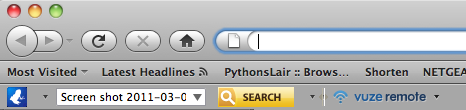
If you have installed Vuze but noticed that there is now a Vuze Toolbar on your Firefox browser there is an easy way to uninstall the toolbar.

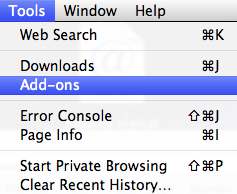
Whilst in Firefox go to Tools –>Add ons:

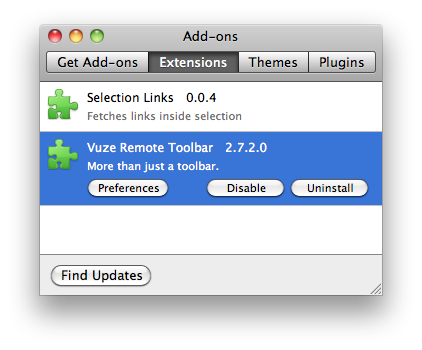
And then highlight the Vuze Remote Toolbar and click Uninstall:

This will bring up a prompt asking if you are sure you want to Uninstall Vuze Remote Toolbar:
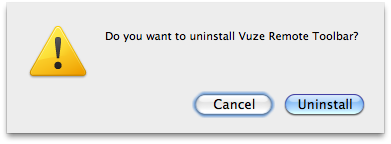

Click Uninstall. It will then Uninstall the toolbar for you and prompt you to restart your Firefox:
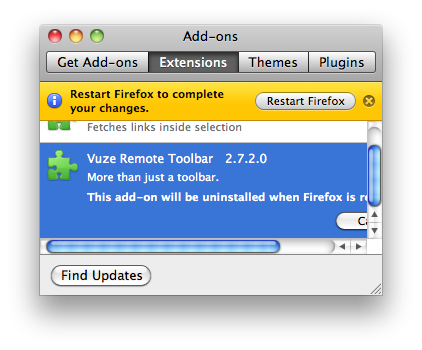
That’s it, all done. After you have restarted Firefox the Vuze toolbar will be gone forever.
I had some similar problems on the Win side and I managed to get rid of this vuze toolbar. The funniest thing is that I found instructions for removing it on they’r site 🙂 http://www.vuze.com/remove-vuze-toolbar.php
thank you. very annoying.
Thanks sssoooo much. This toolbar was stopping me from accessing my email contacts when microsoft was updating its email system!
Yay!!!!!!! I have been searching for this tip for DAYS! Thank you sooooooooooooo much!
Well, as you say it’s appears to be uninstalled quite easy, but elass not so. When you do a search in Firefox you get still the results from conduit and there is no way to know where it is if you want to remove it. I don’t like the it, it’s a piece of no good program.
OMG, Thank you soooooooo much! This is the only thing that worked for me!!!